Live availability & pricing
Change a unit’s status or price once. Every tour opened afterwards, on your website, a gallery tablet or a shared link, shows it within 30 seconds.
- 30 s
- at most from a change until the next opened tour shows it
- 3
- statuses: available, reserved, sold
- CSV
- in and out, with a preview of what changes
- 2 roles
- owner and sales, every change logged
Units on sale
| Unit | Floor | Plan | Area | Status | Price (GEL) | Changed | |
|---|---|---|---|---|---|---|---|
| 4001 | 40 | 2BR residence2 bed | 100 m² | Available | 597,000 | 2 minutes agoLayla S. | |
| 4002 | 40 | 1BR residence1 bed | 65 m² | Available | 379,000 | 5 days agoOmar K. | |
| 4003 | 40 | 1BR residence1 bed | 65 m² | Sold | 382,000 | last weekLayla S. | |
| 4004 | 40 | 2BR residence2 bed | 100 m² | Available | 592,000 | 2 minutes agoLayla S. | |
| 4005 | 40 | 1BR residence1 bed | 65 m² | Available | 375,000 | 3 days agoOmar K. | |
| 4006 | 40 | 2BR residence2 bed | 100 m² | Available | 573,000 | 2 minutes agoLayla S. | |
| 4007 | 40 | 2BR residence2 bed | 100 m² | Reserved | 598,000 | yesterdayOmar K. | |
| 4008 | 40 | 1BR residence1 bed | 65 m² | Available | 364,000 | 5 days agoOmar K. |
In short
InsideWalk keeps one record for every unit of your project: its status (available, reserved or sold) and its price. Your sales team changes it in a dashboard, one unit or a whole floor at once, or by CSV. The 3D tour embedded on your website reads that record, so the next tour opened there shows a change within about 30 seconds, with no edit to your site.
It is the commercial state the tour needs, not a CRM: leads, deals and payments stay in your sales system. See integrations for what it connects to.
Bulk edits
Tick a floor, a building or a search result and change them together: set a status, set one price, make every price “on request”, or move prices by a percent or by an amount. A unit already as asked is left alone, and every change goes to its history.
- Mark a whole floor sold or reserved
- Raise a building’s prices by 3%
- Lower the unsold units by 5,000 each
Change 3 units
Applied to every selected unit at once, and written to their history. A unit already as asked is left alone.
Status
Leave statuses as they arePrice
Raise or lower by a percent…3(percent)From your spreadsheet
Export the list (id, building, label, floor, plan, area, status, price), edit it in Excel or Google Sheets and import it back. The dashboard reads the file first and lists exactly which units would change; nothing is written until you apply. A file with unreadable rows is refused whole, with the lines named.
- Empty cells leave a unit as it is
- Rows that name no unit are skipped and listed
- Export the current list whenever finance asks
Import from a spreadsheet
Nothing is changed until you apply. Empty cells leave a unit’s status or price as it is.
4 units would change, 2 already as in the file.
- Tower · 4007 set the status to sold (was reserved)
- Tower · 4004 set the price to 600,000 (was 592,000)
- Tower · 4001 set the price to 610,000 (was 597,000)
- Tower · 4005 set the status to reserved (was available)
How a change travels
- 01
You change it
A status or a price in the dashboard, a bulk edit of a whole floor, or a CSV you import.
- 02
It is saved and logged
The unit’s record is updated and its history notes who changed what, and from where.
- 03
The tour reads it
Each time a page of your project opens, the tour asks for the current statuses and prices. The answer is kept for 30 seconds.
- 04
Buyers see it
On your website, on a gallery tablet and in shared unit links. The counts per floor and per building follow.
What buyers see
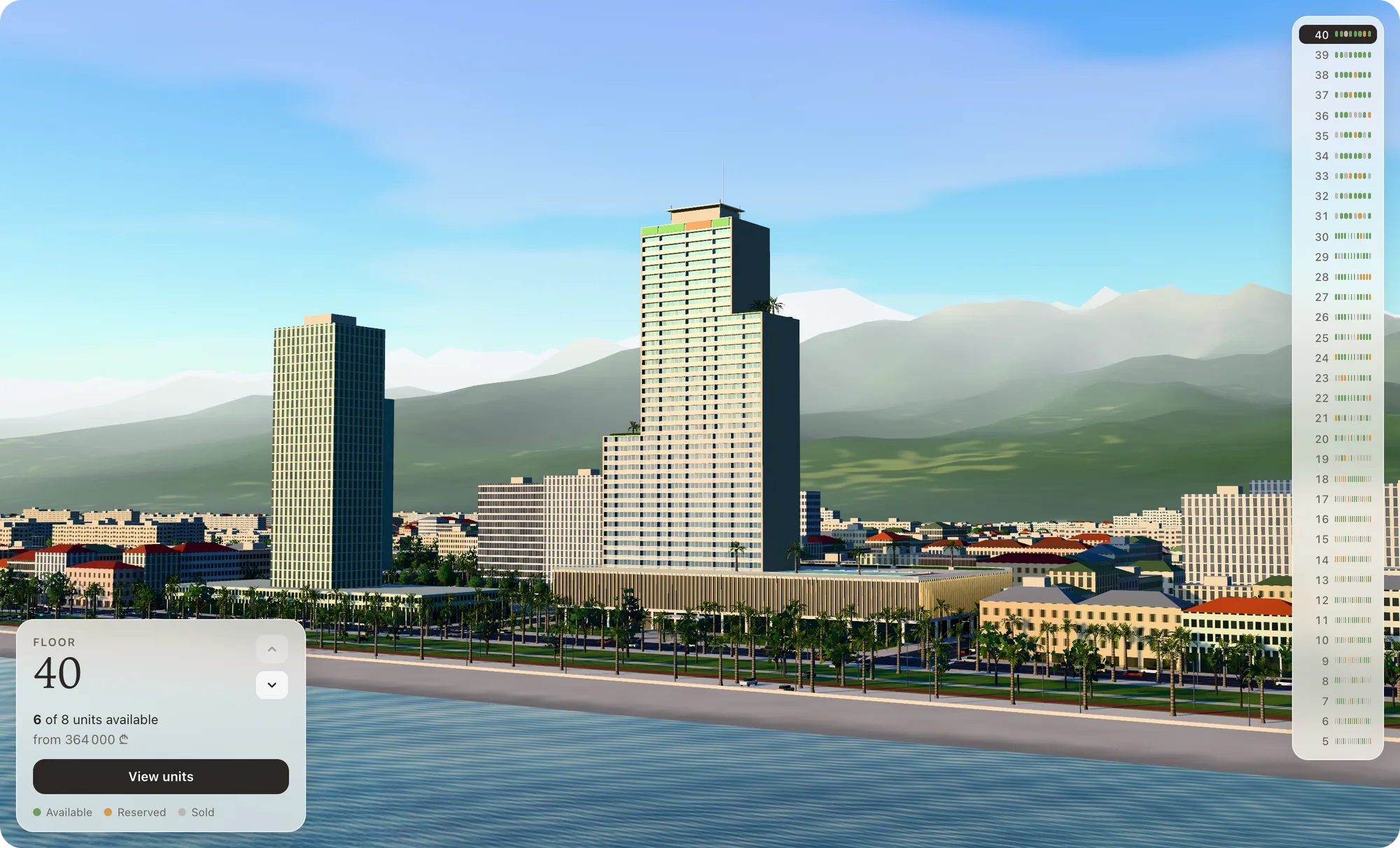
The floor strip shows how many units are left on each floor, the building card says “6 of 8 units available” with the lowest price, and every unit shows its status and price as you set them. If the current statuses can’t be loaded, the tour says Ask sales instead of a stale price: a unit whose status can’t be loaded is never shown as available.
On your public website you can hide prices, or dim or hide sold units, per embed, while a private sales page shows everything.
Available
4008
364,000 ₾
Reserved
4007
Reserved
Sold
4003
Sold
Status unavailable
Any unit
Ask sales
Who changed what
Every change is written down with who made it, when, and where it came from: the dashboard, a CSV import or InsideWalk’s own team. Open any unit to see its last 50 changes, so “who reserved 4007?” has an answer.
Owners do everything: team, embeds and units. Sales staff change units, status and prices. People sign in with an emailed code, and only at addresses an owner has invited.
Tower · 4007
The last 50 changes.
- Omar K. set the status to reserved (was available)Yesterday, 17:05
- Layla S. set the price to 598,000 (was 590,000) (spreadsheet)14 Mar, 11:20
- Omar K. set the status to available12 Mar, 09:30
Where it stops
What it does
- Holds the status and price of every unit the tour shows
- Updates the website, the gallery and shared links from one place
- Keeps a history of every change, by person
- Hides prices or sold units per embed (embedding)
What it does not
- Handle leads, contacts or deals: those stay in your CRM
- Take deposits or payments: it records that a unit is reserved, nothing more
- Expire a reservation by itself: someone sets the status back
- Units
- Every unit on every floor, with its price and status
- Dashboard
- The unit table, bulk edits, CSV, history and your team’s roles
- Distribution
- Embeds for your website and a short link for every unit
- Hosting
- 12 months of hosting and price or availability updates
Questions
How fast does a status change appear on our website?
On the next page that opens, within about half a minute. The tour reads the current statuses and prices from InsideWalk each time a page of your project opens, and keeps the answer for 30 seconds. A tour already open on a screen shows the change when it is reloaded or opened again.
Who can change a status or a price?
The people you invite. Sales staff change units: status and prices. Owners also manage the team and the embeds. Every change is logged under the person’s name.
Can we update prices from Excel or Google Sheets?
Yes. Export the unit list as CSV, edit it and import it back. The dashboard lists which units would change before anything is written, and refuses a file with unreadable rows whole.
Can we hide prices?
Yes, per embed. A tour on your public site can hide prices while a private sales page shows the full list.
Can sold units be hidden?
Yes. In each embed, sold units can be shown marked sold, dimmed, or hidden. The building’s “available” count stays honest either way.
Does it replace our CRM?
No. It holds the commercial state of each unit (status, price, history) that the tour shows. Leads, deals and payments stay in your sales system, and a unit’s share link goes into any CRM card.
Can buyers search for an apartment by price, size and floor?
Yes. Every project page has an apartment finder: buyers filter all units by bedrooms, area, floor, price, the side they face and status, compare up to four side by side and see the matches marked on the building. It reads the same status and prices.
Is it included in the price?
Yes. The dashboard and 12 months of hosting and updates are part of the building price on the pricing page.
Keep exploring
- Embed on your websiteA unit, a building or the whole project, with a snippet or an iframe.
- IntegrationsYour website, a spreadsheet, analytics and a share link for every unit.
- Interactive floor plansPlans buyers click, furnish and price on your site.
- PricingFree sample unit, a fixed-price pilot, then per unit.
Free sample unit
Free and without commitment: one of your units, furnished and priced, on a private link.
Or email the plan to hello@insidewalk.app