Architectural animation for new builds, rendered from the 3D model
What architectural animation is, what a 3D walkthrough or flythrough costs in the US, UAE and Poland, and how a 4K film comes from your 3D model.
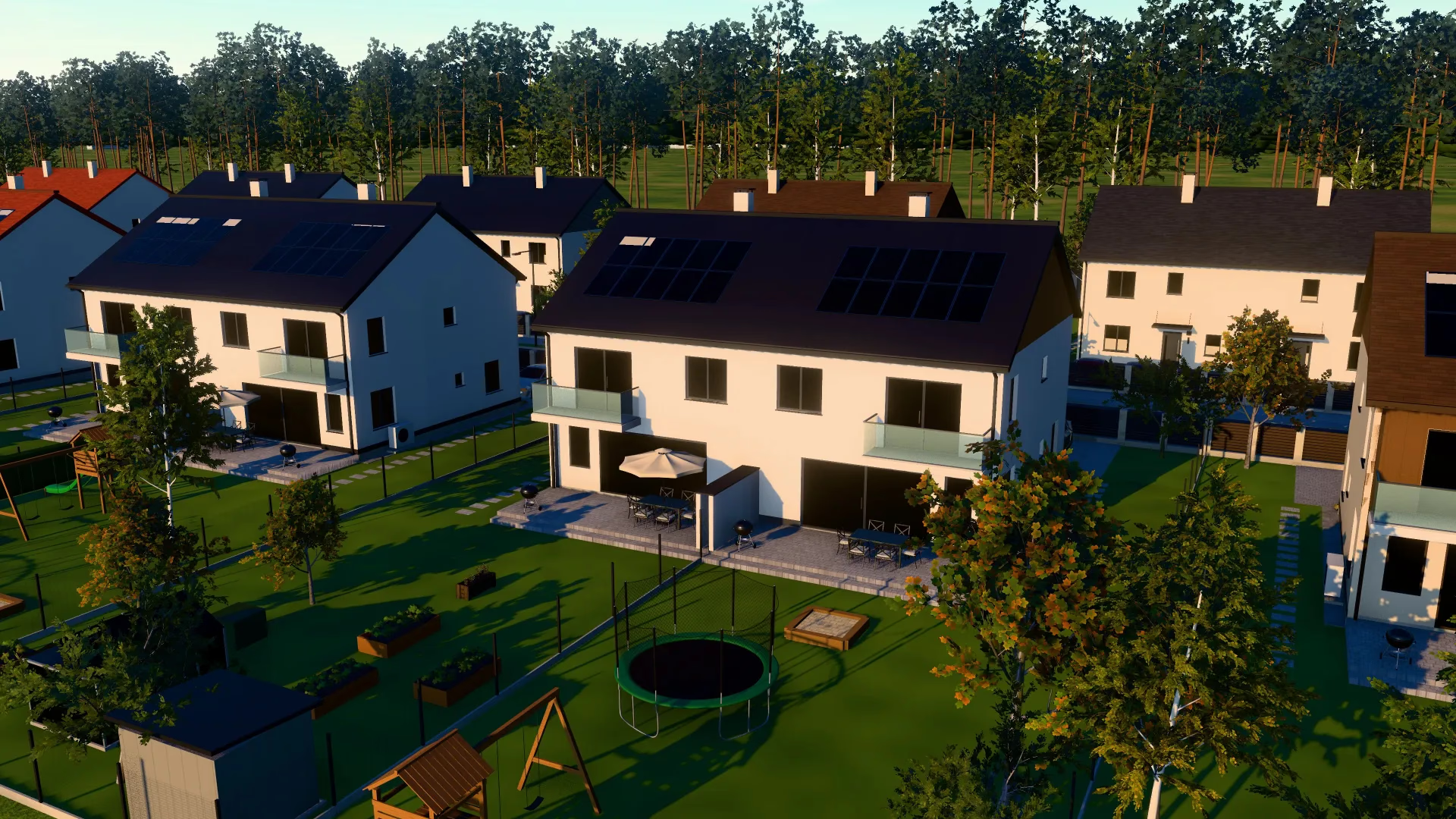
Architectural animation is a rendered film that moves through a building before it is built; studios publish $2,000–15,000+ per finished minute in the US and AED 10,000–25,000 for a 60-second walkthrough in Dubai. A developer selling off-plan has drawings, a site plan and a few renders. Buyers have trouble turning those into a place they want to live, and a still image doesn’t show how the rooms connect or what you see from the terrace. A film shows both.
This guide explains what it is, the kinds of shots that work, what studios charge for it in three markets, and how we make one without a separate studio project: rendered frame by frame, in 4K, from the same 3D model a buyer walks through in the browser.
The example: a semi-detached house outside Warsaw
The film is a concept for a pair of semi-detached houses on a new estate at the edge of Warsaw, on 13 × 38 m plots with the Polish building line, 6 m back from the street. It has six shots:
- A short fly-in from about 50 m over the estate: the gardens, the field road, the pine forest behind. The camera lands on the house from the garden side.
- The terrace at eye level: the dining set, the parasol, the grill, the sliding doors to the living room.
- The street: pavements, kerbs, the slatted fence and the gate, the house in the evening shade.
- The living room and kitchen: a slow walk from the sofa to the kitchen island.
- A bedroom on the first floor.
- A rise over the garden and the estate to finish.
Every frame comes from one model: the house, its plot, the street of pairs like it, each garden different (a pool, a trampoline, a greenhouse, a pergola), and every room furnished. No drone, no camera and no generative AI was used.
What architectural animation is
Architectural animation is a rendered video of a building or interior, made from a 3D model, with a camera moving through it as a film crew would. It sits between two other tools:
- A render is one still image. It sells a mood, and the developer picks the single best angle.
- A virtual tour is interactive. The buyer moves around themselves, opens any unit and looks where they want.
- An animation is directed. The developer chooses the path, the pace, the light and the order in which things are seen, and the result plays anywhere a video plays.
Studios usually split 3D architectural animation into exterior shots (the building in its setting, often from a drone’s height), interior shots (walking through the rooms), and mixed films that go from one to the other. Two terms come up all the time:
- A flythrough is the aerial part: the camera flies over the site and around the building.
- A walkthrough is at eye level: the camera walks through the rooms at a person’s height.
Most real estate films are both: a flythrough to set the scene, a 3D walkthrough animation to sell the home.
Why developers use it before construction
Off-plan, nothing exists to film. That is the main reason pre-construction marketing leans on 3D: the animation is the only way to show the finished street, the garden in the evening sun, or the view from the bedroom while the plot is still a field.
It also does a few things renders can’t:
- It shows sequence. You walk from the hall to the kitchen to the terrace, so the plan makes sense in a way it doesn’t on paper.
- It shows the setting. Distance to the forest, the width of the street, how close the neighbours are. Buyers of houses care about the plot as much as the rooms.
- It travels. One file plays on a listing portal, in an ad, on a sales-office screen, and cut down for social media as a real estate marketing video.
For a house builder, a new construction marketing video does a job the brochure can’t: it shows the estate as it will be in five years, with grown trees, lived-in gardens and cars on the drives, not as a plot of mud. For an apartment developer, real estate 3D animation is the way to show the amenity deck, the lobby and the view from a high floor long before the crane comes down. And a 3D house animation of a single plot is a strong pitch to a buyer who has to choose between your house and a resale one they can visit today.
What it doesn’t do is let a buyer look at what they want. That is the job of an interactive 3D tour. The two work best together: the film gets attention, the tour answers the questions it raises.
Anatomy of a 45-second new-build film
Long films lose people. A new-build film that works on a phone is 30–60 seconds, built from short shots of 5–8 seconds each, with a crossfade between them:
| Shot | Length | What it does |
|---|---|---|
| Fly-in over the estate | 6–8 s | Location, neighbourhood, scale |
| Garden or terrace at eye level | 6–7 s | The outdoor life buyers pay for |
| Street and entrance | 5–7 s | Arrival, parking, the fence and gate |
| Main living space | 7–8 s | The room that sells the home |
| Bedroom or the best view | 6–7 s | Something personal |
| Rise out, logo | 5–8 s | A clean end for the call to action |
A few rules from making ours:
- Start close. A long drone approach from far away shows the parts of the model that matter least. Our first draft opened with a long flight in; we cut it to a short fly-in from 50 m.
- Keep the horizon out of high shots. Looking down on the estate keeps the frame full of the project, not of distant scenery.
- Never let the image flicker. Light that changes from one frame to the next reads as cheap. Interior lighting in our film is baked once for the time of day, so every frame is lit identically, and every clip is checked frame by frame for jumps before it is encoded.
- Furnish the outside. An empty lawn looks like a render. Garden furniture, a trampoline, a shed, cars on the drives and real trees make it look lived in.
From the interactive model to a 4K video
Studios build a separate scene for each animation in 3ds Max, Unreal or Lumion, then render it on a farm. That is most of the cost and most of the 2–6 weeks.
We start from the model that already exists for the 3D floor plans and the tour. The building, the furniture, the finishes and the plot are already there, built from the developer’s drawings. A film is a camera path through that model:
- Plan the shots as camera keyframes: where the camera is, what it looks at, the lens.
- Approve a storyboard. Start, middle and end frames of each shot at low resolution, before anything long is rendered. This is where most changes happen, and they cost minutes.
- Render every frame in 4K (3840 × 2160, 30 frames a second) in the same engine the tour runs on, with the light baked indoors and the sun fixed outdoors.
- Check every clip for frames that jump, then join the shots with crossfades and a fade to black.
Because the model is shared, a change to the project (a new finish, another layout, a different facade colour) shows up in the tour and in the next cut of the film. Nothing has to be rebuilt by a second team.
What architectural animation costs
Published prices for 3D architectural animation vary widely with length, resolution and how much of the scene has to be built:
| Market | Published price | Source |
|---|---|---|
| United States | $4,000–10,000 per minute at standard quality; $15,000+ per minute in 1080p | Cad Crowd |
| United States | $2,000–15,000+ per finished minute, or $50–200 per second | Maverick Frame |
| UAE | AED 10,000–25,000 for a 60-second walkthrough; AED 25,000–100,000+ for a cinematic launch film | Real Estate Club Dubai |
| Poland | Interior animation from €1,800, exterior from €2,700 | Maverick Frame PL |
These are published ranges, not quotes. Typical turnaround is 2–6 weeks, and a rush adds 20–50% in Dubai.
What drives architectural animation cost:
- Building the scene. Modelling the building, the interiors and the surroundings. This is the biggest item, and it is paid again for every new film unless the scene is reused.
- Length. Priced by the second or the minute.
- Resolution. 4K takes about four times as long to render as 1080p.
- Surroundings. Landscaping, streets, neighbouring buildings and people.
- Revisions. Changing a camera path after the final render means rendering again.
When the 3D model already exists for the sales tour, the scene building is mostly done, so a film becomes a camera plan and a render rather than a new production.
How long it takes and what we need
From the developer:
- The floor plans of each unit type (PDF is fine) and the elevations or facade renders.
- The site plan with plot sizes, setbacks and the street layout.
- The finish palette, if there is one. If not, we propose one.
- A rough idea of the story: what the film should show first and what it should end on.
Once the model exists, the storyboard comes back in a day or two. After it is approved, the 4K render itself takes a few hours of machine time.
Where to use the film
- Listing portals and the project page. The 16:9 cut at 1080p, with a poster frame, loaded only when someone presses play so the page stays fast.
- Social. Vertical 9:16 cuts of 15–30 seconds for Reels and TikTok, with an end card carrying the link to the tour.
- The sales office and events. The 4K master on a large screen.
- Ads. The fly-in alone works as a 6-second bumper.
Always put the link to the interactive tour next to the film. The film creates the question, and the tour lets the buyer answer it.
Getting a film of your project
InsideWalk turns a project’s floor plans into walkable, furnished 3D tours of every unit. The same model makes the film. Start with a free sample unit from one of your plans, and see the pricing for a whole building.